Getting Creative with Rendering on Playdate
Just over 3 years ago I was working on a little prototype for a Playdate game, and I wanted to make use of some of the more unique aspects of the device. If I only had access to one colour, I figured it would be cool to lean into it and make a game that is all about navigating the darkness with a flashlight.
A good deal of effort was spent on ensuring that the raycasting and drawing of the polygons for the shadows being cast weren't too expensive so that the game could be performant, and there could be a lot going on in the environment. In spite of these efforts, it turns out that a significant bottleneck on performance was the cost to update the screen at all.
Just about the most expensive thing you can do on this thing is update the screen. Because it uses a memory LCD display, pixels can just stay "on" without having to refresh the whole screen each frame. This means huge gains can be won by simply not updating any part of the screen where it is not necessary.
Intuitively, you'd think this would be to my benefit: most of the screen is black. The game should only have to update the small cone in front. However, if we enable the visualizer which highlights screen updates, we can pretty immediately see the problem:
It doesn't really matter how much space the cone actually takes up, as anything that is within the bounding box of the arc's shape is also going to get updated, even if most of those pixels never changed.
It was a little worse than this on my first pass, as it was technically drawing the whole arc around the player, so I did come upon some improvements. This limitation also had me shorten the distance of the light just to ensure it wasn't updating the entire screen constantly. So I'm already making sacrifices because of this issue.
I spent some time trying to imagine how I could address this, as the pressure on performance would have definitely impacted just how much I could actually do with the game. On top of that, these redundant updates would drain the battery faster, and I'd hate to have players have to reach for their charger more frequently just because of a little extra movement in a game. Eventually, I sort of lost interest and this project has been sitting on ice ever since.
Fast forward to very recently (this past week), and I've been thinking about this problem again. In its simplest form, say you had a circle just moving across the screen, nothing else in the game at all. Already, you're capped at ~50 fps.
Simulator performance is not indicative of device performance, but the simulator seems to do a good job of representing the frame cap you would get from screen updates specifically.
Not only do you not need to be updating all of the pixels on the outside of the circle, but most of the pixels on the inside of the circle also remain unchanged as it moves. Really, it's just the edges of the circle that should be updating. So I started thinking, what if I did two things:
- Split the shape into smaller pieces, redrawing it all using the
playdate->graphics->fillRectfunction. - Cache the bitmap data each frame and only selectively redraw those portions where there is actually a difference.
To do this, we'd have to iterate over each pixel in the image, which I recognize is probably going to be a bit of a non-starter. I just can't imagine sampling up to 96,000 pixels in a loop is going to be any faster than just letting the playdate do its thing. So I figured let's try it scaled down to half resolution.
Step 1 would be to draw the scaled down shape:

Then we iterate over each pixel, and try to expand rectangles until we hit an edge. From that, we can draw each rectangle at 2x scale. Animated here with an outline instead, and with an exagerated scale to illustrate the concept:
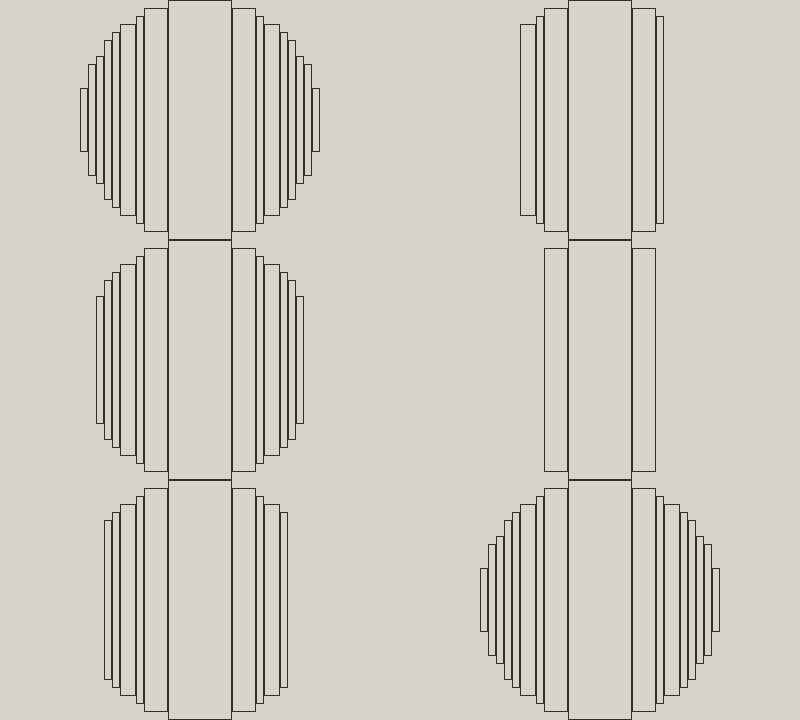
The process needs to be repeated for the negative space around the shape, since we'll need something that will be able to clear segments as the shape moves too.

In fact, we can take this a step further and have multiple channels, each with a "colour" assigned to it by some dither weight. For instance, we can make a shaded circle like so:
One channel which has a crescent shape for a darker shadow.
 Another channel that will make up the rest of the circle.
 Let's skip the white channel since it's the same as we've already seen, and take a look at our circle combined.
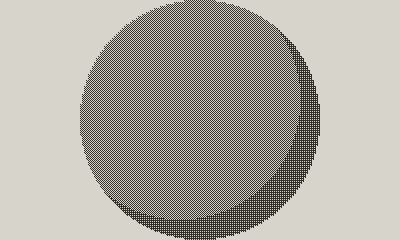
One particular advantage of rendering things like this is that you can move the images around in the channels, and the dither patterns will stay consistent to avoid any kind of eye-destroying flickering (A good example of this effect can be seen on Playdate's Designing For Playdate page). Let's actually take a look at this thing in motion now, and compare the orange highlights to what we had before.
Hot damn! That's a lot better than before, and you can barely even see the highlights anymore! Unfortunately, though, the simulator is really really not a good representation of the kind of performance you'd get on device. At the resolution we're rendering to, we're definitely hitting a point of diminishing returns, kind of floating between 60 fps at best, and 25-30 fps at worst. Your mileage is really going to vary on this depending on the complexity of the shape, how fast it is moving, and how much of the screen it takes up. Making design decisions such as reserving portions of the screen for a HUD could help to take this further.
I tried scaling it down even further, rendering at a quarter of the resolution, and I was thrilled to see that even on device, it was managing to sit around 99 fps (the max that the FPS counter can display). I'm not even too bothered by the lower resolution, because for my purposes, if I were to take this to the flashlight game, I can blur the edges a little with a dither pattern to make it feel a lot less chunky.
This was a fun little experiment, and honestly I was pretty skeptical that it would yield great results, but I figured it was worth a shot. I'm glad I saw it through, and I look forward to seeing what can be done with it. Hell, there's probably tons of room for improvements, since I'm not the world's most knowledgeable C programmer, so there's probably some little micro-optimizations that could go a long way to stretch performance for this. If you're curious and want to see my questionable C code, you can take a gander at the source.